
Staff Copilot
An AI writing assistant that drafts the week, the reply, and the summary, grounded in your institution.
See it draft your week
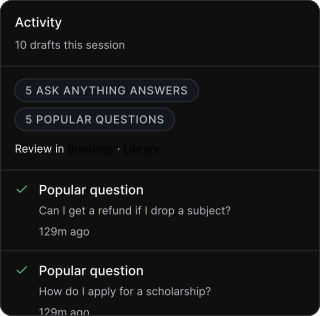
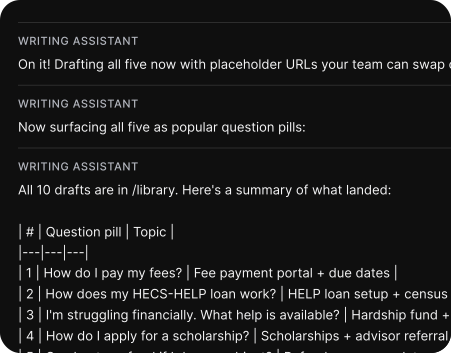
It lives in the console, knows your cohort, and turns a blank page into a first draft your team edits and owns.
Draft a weekly briefing, a help reply, or a thread summary in seconds, grounded in your institution, then edited and sent by a human.
Drafts the writing, keeps the judgement yours
Writing the week, replying to a help thread, summarising a long conversation: the words add up, and they fall on a stretched team. First Six's writing assistant takes the blank-page weight off, drafting in your institution's context so staff can edit and send instead of starting from nothing.
It runs inside the staff console, grounded in your active cohort and your content, and it stays a drafting tool. A person reviews, edits, and decides; nothing reaches a student without a human.
.svg)
Less blank page, more sent
It lives in the console, knows your cohort, and turns a blank page into a first draft your team edits and owns.
01
Ask in the console
Open the assistant from the staff console and ask in plain language: draft this week, reply to this thread, summarise this conversation.
02
It drafts in context
Grounded in your institution and active cohort, it returns a first draft that already fits your voice and your students, not a generic template.
03
You edit and own it
Every draft is a starting point. Your team revises, approves, and decides what actually goes out.
04
Send like always
Publish the briefing or send the reply through the normal flow. The assistant never messages a student on its own.
See it draft your week
Book a demo and watch the assistant turn a blank page into a briefing your team edits and sends.
What we never do. The line between support and surveillance, drawn clear.
Support means seeing the pattern, not the person. We built the line between helping and watching into the product itself.
Never trains on student data
What staff submit to the assistant is never used to train models.
Never sends on its own
It drafts; a human reviews, edits, and sends. The assistant never messages a student.
Never sees private spaces
A student's private workspace and notes stay off-limits, to the assistant just as to staff.
Never the final word
Every draft is a starting point your team owns and checks, not an answer to ship blind.
Plugs into the systems you already run
SSO, roster sync, calendar integration. Your stack stays yours, and your students see only your university.
SSO, no new passwords
Sign in with Microsoft Entra or any OIDC provider (SAML on the roadmap). Staff sign in as themselves.
Roster sync keeps cohorts current
Roster import keeps your cohorts current, so the assistant's context stays accurate; a direct SIS push endpoint is in early access.
Grounded in your console
Drafts come from your institution context and active cohort, and drop into the authoring and inbox flows your team already uses.
Outbound webhooks
Subscribe your own systems to signed First Six events (request created, crisis, updated, resolved), delivered over HTTPS with an HMAC signature you verify.
Help desk & CRM (email-to-ticket)
When a student asks for help, open a ticket in the help desk your staff already watch (ServiceNow, Salesforce, Jira Service Management, Zendesk), via email-to-case.
Calendar (ICS)
Add events to the calendar students already use.
Student information system
Sync enrolment and audience groups from your student information system. CSV roster import is available today; the direct push endpoint is in early access.
SAML 2.0
Single sign-on via SAML 2.0. In progress.
OpenID Connect (OIDC)
Standards-based single sign-on via OpenID Connect.
Microsoft Entra ID
Single sign-on via Microsoft Entra ID using OIDC.
FAQ
Questions about how First Six works and what it does for your students.
No. It only ever drafts. A staff member reviews, edits, and sends; the assistant never messages a student on its own.
No. What staff submit to the assistant is processed to produce a draft and is never used to train models. See the Trust Centre for the detail.
Drafting weekly briefing content, replying to help-inbox threads, and summarising long help conversations, plus quick questions about how a cohort is travelling, all from inside the console.
No. A student's private spaces are off-limits to staff and to the assistant alike. It works from institution and cohort context, not private student content.
It's built on the Anthropic API, with limits on how much it processes per request. The assistant is staff-only and runs inside the console.