
Support, not surveillance
Reach the students who never raise their hand, without breaking the trust that makes them answer honestly.
Early support, inside a privacy model you can defend in procurement

Four steps, with a privacy guardrail at every one.
A short list of the students who might need you this week, built only from what they chose to tell you in a check-in, with every look on the record.
Early intervention without surveillance, made practical
Some students who are struggling never raise a hand. Your team can find them without tracking what they do. The weekly check-in is on the student's side, never a grade and never held against them, and it is designed that way so students can answer honestly.
In the Students area, the Needs attention list gathers the students whose own check-ins suggest they could use a nudge, using three published rules:
- Wobbling: their most recent check-in read wobbling or asked for help, or they have flagged more than once in recent weeks.
- Not started: they have never answered a check-in, once the cohort has finished two weeks and they have been on the roster at least a week.
- Gone quiet: they used to check in and have answered none of the last three finished weeks.
The list reads check-in answers only: not logins, app opens or page views. There is no predictive risk score and no model guessing who might leave. The reason sits against each name, and the profile drawer explains the rule and what it cannot tell you. Opening the list, and opening a student's record, are both written to your audit log, and staff scoped to a campus or program see only their own students.
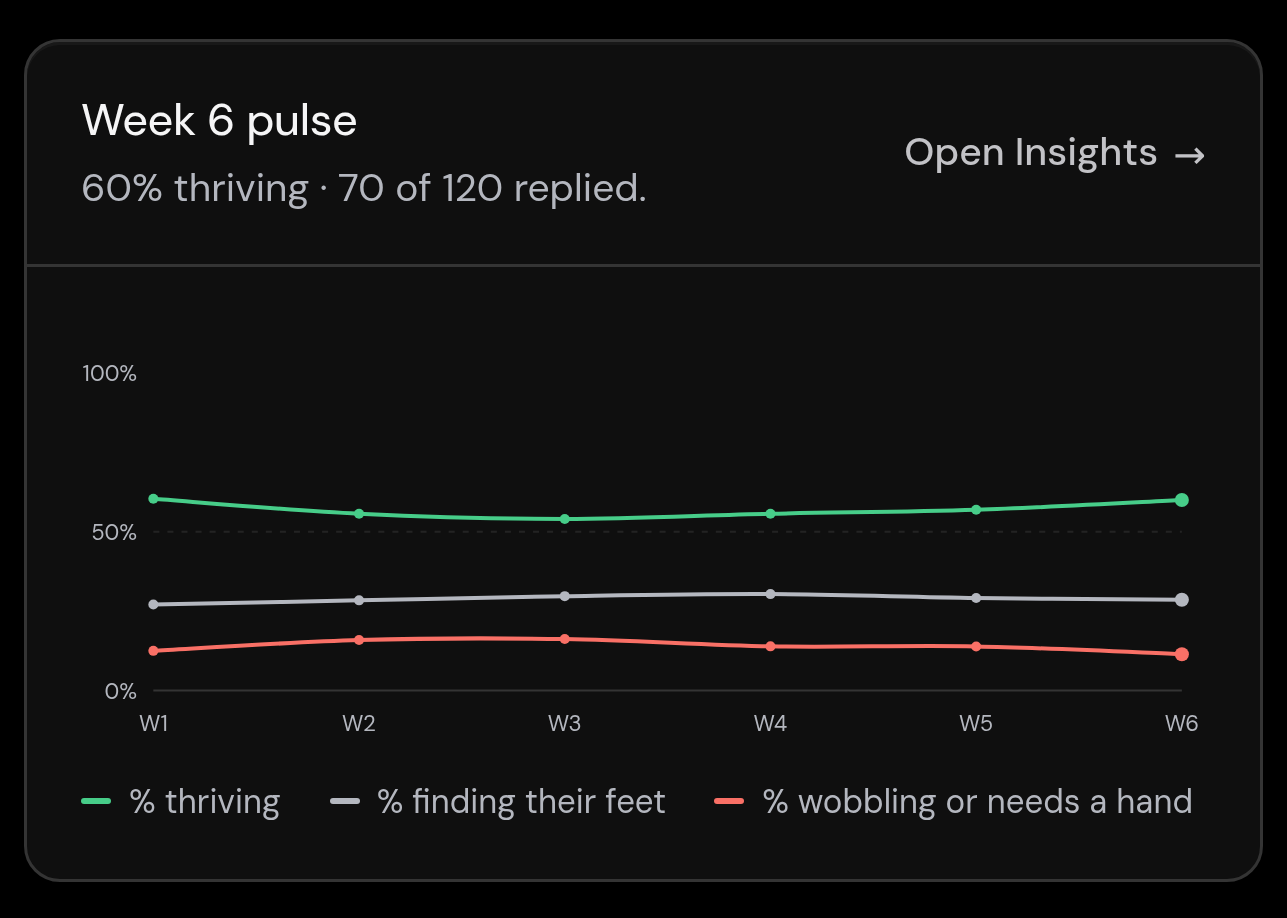
Alongside it, Insights shows a coordinator where a whole cohort is drifting, in group figures that name no one. How the Needs attention list decides.
How it works
Four steps, with a privacy guardrail at every one.
01
Students check in, in a few seconds
Once a week, a student says how they are travelling. It is never a grade and never held against them, and it is designed that way so the answer can be honest.
02
The cohort picture shows where to look
Aggregate insights show a coordinator which weeks and which groups are wobbling, in group figures that never name a student.
03
Reach the students who will not raise a hand
Students whose own check-ins read wobbling, who have never checked in, or who have gone quiet appear in one list, each with the reason shown.
04
Every look is logged
Opening the list and opening a student's record are both written to your audit log, so looking is as accountable as changing.
Early support, inside a privacy model you can defend in procurement
The signal students generate becomes something a coordinator can act on, person by person, within what students are told staff can see.
Where we draw the line between support and surveillance.
Support means hearing from students, not watching them. Staff read the cohort in aggregate, every look at an individual record is logged, and nothing is inferred from clicks or log-ins. We built that line into the product itself.
Never a standing register
It is an on-demand list a staff member opens when they choose to look, not a standing register running quietly in the background.
Never a predictive score
No model guesses who might leave. Three published rules read check-in answers only, never logins, app opens, page views or the aggregate cohort insights.
Never unlogged
Every time a staff member opens a student's record it is written to an audit trail the institution owns.
Never held against a student
A hard week is a prompt to reach out, not a mark on a record. Honesty is the point, never a risk.
Plugs into the systems you already run
SSO, roster sync, calendar integration. Your stack stays yours, and your students see only your university.
SSO, no new passwords
Sign in through your own identity provider over OpenID Connect, including Microsoft Entra ID, so there is no First Six password. SAML is a proof of concept only.
Roster sync keeps cohorts current
Import a roster CSV with no IT work, or push roster and enrolment data over HTTPS from any SIS that can produce an extract.
Your help desk, if you use one
Help requests can open a ticket in any help desk with email-to-case, with a separate crisis queue, so follow-up stays in your system.
Outbound webhooks
Subscribe your own systems to signed First Six events (request created, crisis, updated, resolved), delivered over HTTPS with an HMAC signature you verify.
Help desk & CRM (email-to-ticket)
When a student asks for help, open a ticket in the help desk your staff already watch (ServiceNow, Salesforce, Jira Service Management, Zendesk, Freshservice) via email-to-case.
Calendar (ICS)
Pull your institution's events in from a public iCalendar (.ics) feed, and give each student a private feed for Apple, Google or Outlook calendars.
Student information system
Keep cohorts current from your student information system: push roster and enrolment as JSON over HTTPS, or import a CSV with no IT work at all.
SAML 2.0
SAML 2.0 is a proof of concept and is not available for production sign-in. OpenID Connect is the production path; production SAML can be enabled within an engagement that needs it.
OpenID Connect (OIDC)
Single sign-on through your identity provider over OpenID Connect, the production sign-in path. Students and staff never have a First Six password.
Microsoft Entra ID
Single sign-on through Microsoft Entra ID using OpenID Connect, with a documented setup walkthrough. Your MFA and sign-in policies stay in Entra.
FAQ
Questions about how First Six works and what it does for your students.
No. It reads only the check-ins students choose to share with your team, applies three published rules, and shows the reason against each name. It does not score students, track logins or clicks, or draw on the aggregate cohort insights, and every open is audit-logged.
Two ways. Aggregate dashboards show group figures, never names, and only to staff your university gives the insights permission. And an individual's check-ins are only reachable by the staff who support that cohort, with every read logged.
Nothing they have to do, and nothing they can see: being on the list sends them nothing. Students are told in their own guide that support staff can see their check-ins, and if one says they are struggling, the right person can notice and reach out the way your university already does.
An early alert system flags students who may need support so staff can reach out early. Many build a risk score from logins, LMS activity, attendance or library use. First Six is deliberately narrower: its Needs attention list flags students by three published rules that read only their own check-in answers, with no predictive scoring.
Through what students tell you. Wobbling shows a student whose own recent check-in read wobbling or asked for help. Not started and Gone quiet show students you have not heard from, which is a prompt to say hello rather than a finding. First Six does not see grades or attendance, so it sits alongside your academic early-intervention processes rather than replacing them.