
Bring your own assistant
The assistant your staff already use, connected to First Six within limits you set. Public Knowledge Base access works today; staff access is not yet open to institutions.
Bring your IT team's questions
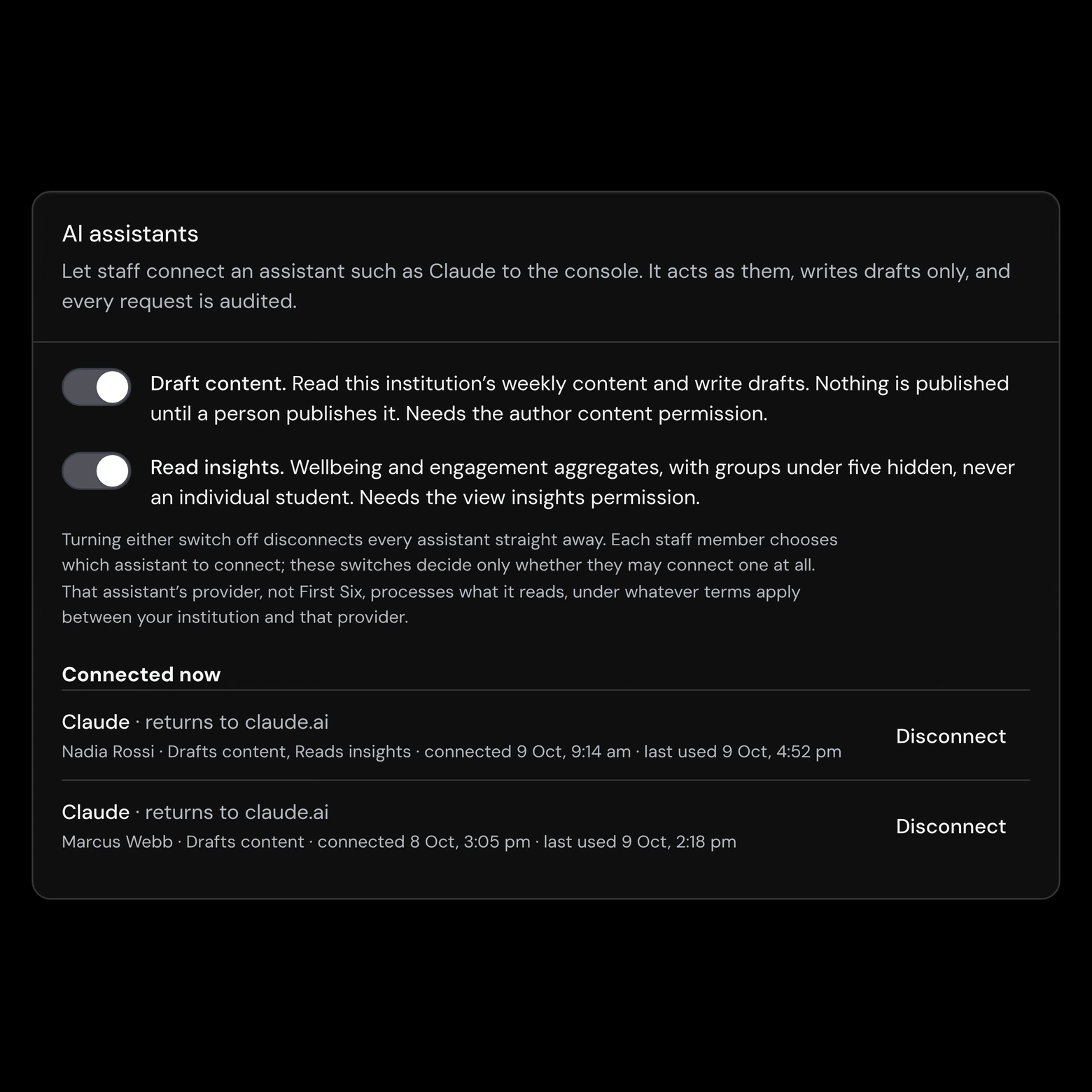
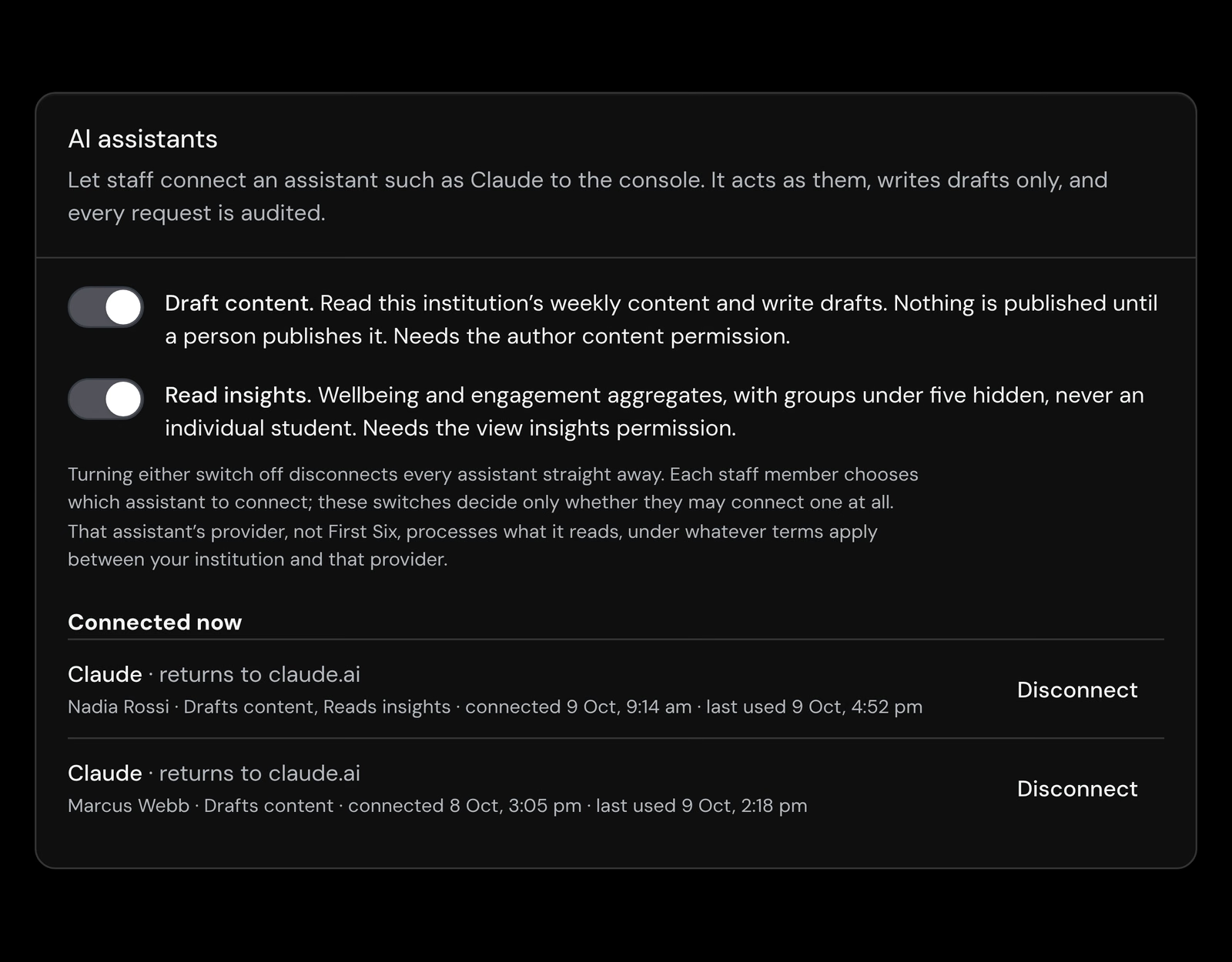
Our switch, then yours, then each person's consent, with every call on the record.
Once offered, staff can use the assistant they already know, limited to their own permissions, and nothing it drafts reaches students until a person publishes it.
Two connections, one open standard
MCP (Model Context Protocol) is the open standard AI assistants such as Claude use to connect to outside sources, and First Six offers two connections over it. The first is open to anyone today, with no sign-in or key: connect an assistant to the public Knowledge Base and your procurement or IT team can question our published documentation, each answer citing its article. Your assistant writes the answers, not First Six, so check the article before relying on one.
The second, a staff connection to the console, is built but not yet available to institutions. Unlike the console's built-in writing assistant, it lets each staff member use the assistant they already have, which acts only as them. It can read a week's content and draft events, weekly blocks, links and Ask Anything answers, but cannot publish, edit existing content, change settings or see an individual student. A separate “Read insights” switch adds group wellbeing figures, rounded to the nearest five, with groups of one to four students withheld. What it reads goes to that assistant's provider at your institution's direction, not as a First Six subprocessor.
The staff connection has been security-reviewed in-house and is live, but switched on only for First Six's own internal test institutions, which hold no real student data. Safeguards come first, among them a per-institution list of approved assistants and small-group protection that holds when reports from different days are compared. No date has been set. Once offered, it stays off until your institution switches it on, and every call is written to your audit log. How the staff connection works.
Three switches, then a person publishes
Our switch, then yours, then each person's consent, with every call on the record.
01
Toggle it
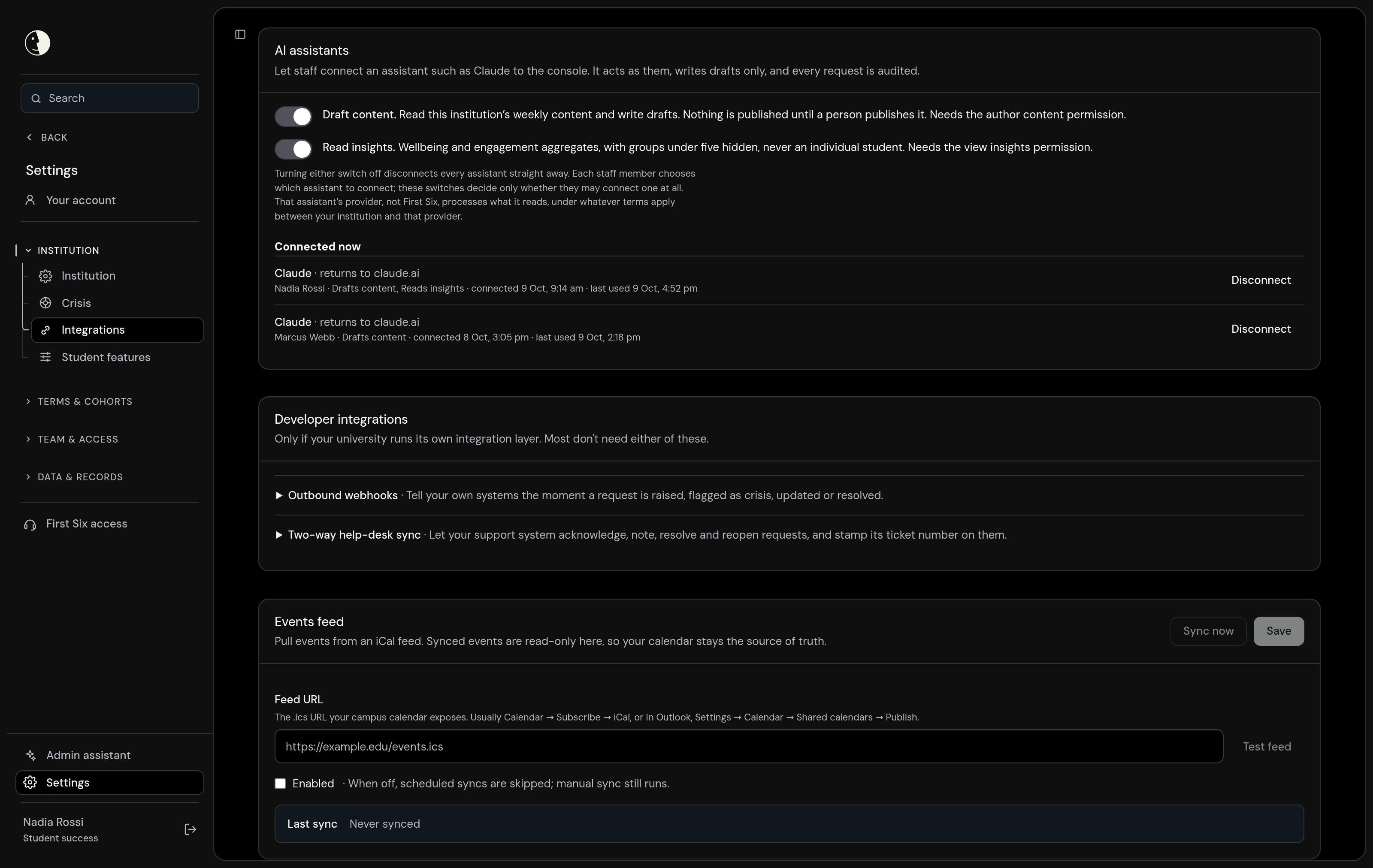
Settings, Integrations has two switches under AI assistants, “Draft content” and “Read insights”.
02
Your institution decides
Each switch stays off until your institution turns it on, and turning either off disconnects every assistant straight away.
03
Each person connects their own
A staff member adds the console's address to their assistant, signs in with their usual university login and approves a consent screen naming them, the assistant, the access asked for and where it returns to.
04
It drafts, a person publishes
It acts as that staff member, within their permissions, and writes only new drafts. Every connection, call and disconnect is written to your audit log, naming the person and the assistant.
Bring your IT team's questions
Point your own assistant at the public Knowledge Base today, then book a demo to walk through the staff connection's switches, consent screen and audit trail with us.
Where we draw the line between support and surveillance.
Support means hearing from students, not watching them. Staff read the cohort in aggregate, every look at an individual record is logged, and nothing is inferred from clicks or log-ins. We built that line into the product itself.
Never publishes
The staff connection cannot publish. It writes new drafts, and only a person can publish them, from the console.
Never sees a student
It cannot see any individual student's information or help requests, or reach the crisis pathway. Insights arrive as rounded group figures, never names.
Never beyond the person
It works only as the staff member who connected it, within their own permissions. Its access stops if they leave or lose the permission it relies on.
Never on by default
Off for every institution today. Once First Six offers it, it stays off until your institution switches it on.
Plugs into the systems you already run
SSO, roster sync, calendar integration. Your stack stays yours, and your students see only your university.
SSO, no new passwords
Staff sign in through your own identity provider over OpenID Connect, including Microsoft Entra ID, for the console and, once offered, for connecting an assistant. There is no First Six password, and SAML is a proof of concept only.
Public Knowledge Base, today
Your procurement and IT teams can question the public Knowledge Base through their own assistant now, with no sign-in or key. Answers cite the article they came from; check it before you rely on them.
Your university's own pages
Once the staff connection is offered, the assistant can read pages staff have connected as Ask Anything sources, labelled as reference material, so drafts can follow what your services actually say.
Outbound webhooks
Subscribe your own systems to signed First Six events (request created, crisis, updated, resolved), delivered over HTTPS with an HMAC signature you verify.
Help desk & CRM (email-to-ticket)
When a student asks for help, open a ticket in the help desk your staff already watch (ServiceNow, Salesforce, Jira Service Management, Zendesk, Freshservice) via email-to-case.
Calendar (ICS)
Pull your institution's events in from a public iCalendar (.ics) feed, and give each student a private feed for Apple, Google or Outlook calendars.
Student information system
Keep cohorts current from your student information system: push roster and enrolment as JSON over HTTPS, or import a CSV with no IT work at all.
SAML 2.0
SAML 2.0 is a proof of concept and is not available for production sign-in. OpenID Connect is the production path; production SAML can be enabled within an engagement that needs it.
OpenID Connect (OIDC)
Single sign-on through your identity provider over OpenID Connect, the production sign-in path. Students and staff never have a First Six password.
Microsoft Entra ID
Single sign-on through Microsoft Entra ID using OpenID Connect, with a documented setup walkthrough. Your MFA and sign-in policies stay in Entra.
FAQ
Questions about how First Six works and what it does for your students.
Not yet. The staff connection is built and live, but First Six has switched it on only for its own internal test institutions, which hold no real student data. Several safeguards come first, including a list of approved assistants for each institution and insights protection that holds when reports from different days are compared. No date has been set.
The writing assistant is built into the console and runs on First Six's own AI provider, named on our public subprocessor list. The staff connection lets a staff member use an assistant they already have, from a provider they choose. It is also narrower: it has no publishing tool, so everything it writes stays a draft until a person publishes it, and it cannot edit existing content, change settings, invite people or message a student. It is not yet available to institutions.
No. It cannot see any student's details, individual check-in answers or help requests, or reach the crisis pathway. With the “Read insights” switch it reads group figures only: counts rounded to the nearest five, groups of one to four students withheld, no names and no students' own words. Each report is checked so that no small group can be worked out from it alone; protection that also holds across reports from different days is required before this is offered to any university.
Any assistant that can connect to remote MCP servers, such as Claude. MCP (Model Context Protocol) is the open standard assistants use to reach outside sources. Today anyone can add https://knowledge.firstsix.com.au/api/mcp in their assistant's connector settings (in Claude: Settings, Connectors, Add custom connector) to read the public Knowledge Base, with no sign-in or key. It is an address for the assistant, not a page to open in a browser. The staff connection is not yet available to institutions.
The provider of the assistant a staff member connects (for example Anthropic for Claude, or OpenAI for ChatGPT) processes what that assistant reads, at your institution's direction and under whatever terms apply between your institution and that provider. In that role it is not a First Six subprocessor: First Six does not choose the assistant or engage its provider for the connection, even where the same company supplies First Six's built-in writing assistant. The data processing agreement we sign with each institution sets this out. As built, each staff member chooses their assistant; a per-institution approved list comes before any university can switch this on.